>/ Metalbox-Store.org
Ultra MIDI
MIDI Controller with Ultrasonic Movement Detection
By Alex K · Jan 6, 2023 · 6 min read
I am new to the microcontroller world, but not new to software engineering. Having worked in the industry almost a decade as an Android developer, I’ve touched various technologies, and at some point I decided to make a physical device.
My passion to music turned into adventure of building various Arduino-based MIDI controllers. At some point I decided to build something special. A MIDI controller that will send notes based on hand motion. My going to use this device as an example.
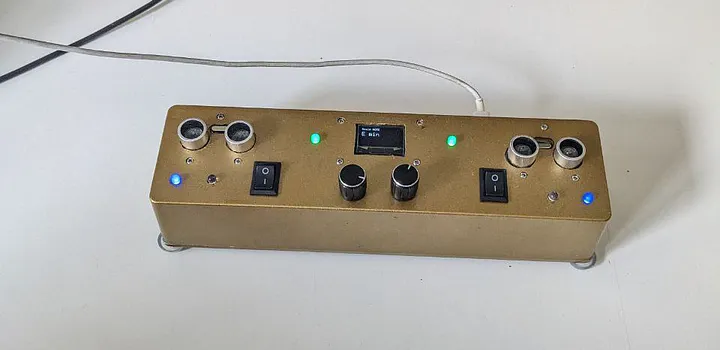
It has 2 Ultrasonic distance sensors, 2 rotary encoders, 6 lamps, a TFT display and a USB-C port. Here is some details on how it operates, source code is here BitBucket.
From all the variety of Arduino boards, specifically interesting are the ones that connected as USB standalone devices. ATmega32_u4 chip based. Other chips are not going to be recognized as a USB device. I already made the nub mistake, trying to build my MIDI controller on a Arduino Nano.The best fit so far is Arduino Pro Micro 5v. It’s small, chip and powerful. But not powerful enough, as it turned out.
Watch the Video
Playing with Pro Micro
There are 3 specs that are important on the chip.
- Clock frequency. For the Pro Micro board it’s 16 khz
- Programmable (flash) memory size — in this case it’s 28 kb
- Number of connectable pins — 18
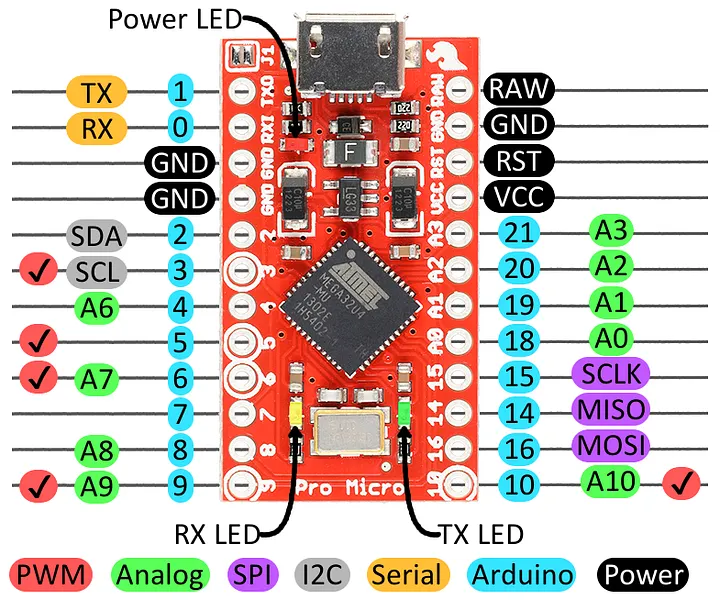
Clock frequency will show itself when there’s a lot of things going on at once. For example if sensor is making readings every 50 millis, and your are turning knob at the same time, the display will lag eventually.
Flash memory size looks ok in the beginning. I’m using VSCode with PlatformIO. Every time a project was built, you will see some memory usage information in the log:

So far so good, but when the program grows with library dependencies, and also code, the memory may become full and nothing can be added without deleting something else. My code, by the way, turned out to be OOP C++.
There’s also Ram memory limitation, but I never reached the limit so far.
Number of connectable pins eventually led me to disabling the rotary buttons, because I didn’t have any pins left.
One more thing to notice here is that the Arduino board has persistent memory storage called EEPROM to save settings. Because my device has a big menu, I decided to save user prefs on the EEPROM. The storage has a limited number of writable cycles — around 1k cycles, which feels kinda flaky.
Looking for the new Chip
I needed a stronger chip, and started looking around and found the ESP32. This board is in more or less 2x price as the Arduino Pro Micro board, but has a much better specs. The board roughly comes it 3 variations ESP32, ESP32-s2, ESP32s3.
The ESP32 does not support USB serial port, so it cannot be user for my project. Of course, I also made an other nub mistake, but lesson learned. Don’t buy it.
ESP32-s2 does not support USB serial out of the box, but it has 2 pins for data transmission, which can be used to put the USB-c port on the box.
ESP32-s3 has 2 USB-C port out of the box. One to program, and an other one to program and connect it as a USB.
I went the hard way with ESP32-s2 Soala, because my device should have port on the box. Ports on the board for this type of devices are easily broken out 2 weeks later by my friend who jams on these machines, and it’s such a shame to re-solder the new board for him. Let’s compare the specs:
Arduino Pro Micro 5v vs. Esp32s2 Soala:
Clock frequency : 16 khz vs. 240MHz
Flash: 4mb vs 28 kb.
Number of pins: 18 vs 43. Now my buttons are going to fit.
Also, Soala uses a regular flash memory for persistence, that does not have such tight of a writable cycle limitation (I’m not sure what exactly the number is, but it is bigger than EEPROM).
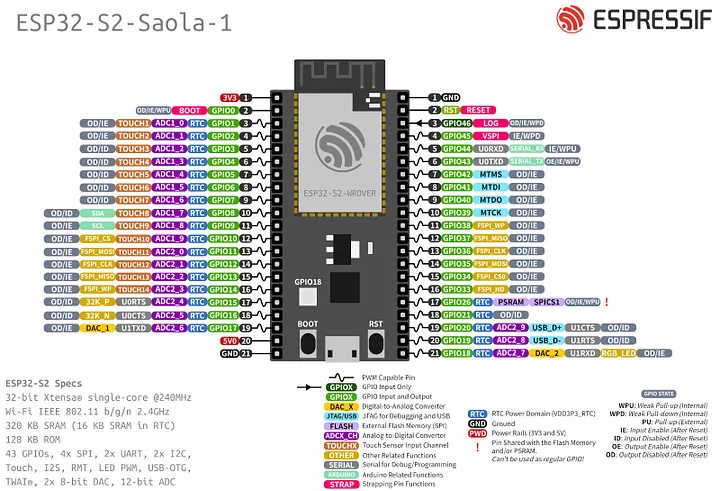
The Soala board is a strong spec winner, but nothing comes for free.
Connecting to USB
The first thing I had to do is connect the pin 19, 20 to my USB-C adaptor. As for the power, be careful to connect the USB-C to 5v, and the rest of devices on the board like the display to 3v3 pin. Otherwise something will burn — a TFT in my case.
The ESP32 can be programmed with Arduino SDK and all the libraries, but with few exceptions. Arduino devices like Pro Micro uses an sdk library to connect to the USB. A well known MIDIUSB library for Arduino is built on top of the sdk. It is not going to work with the ESP32 board.
Compilation issues
To be able to connect the ESP32 to a computer USB, a special library should be used AdafruitTinyUSB, and a MIDI library that runs on top of it https://github.com/FortySevenEffects/arduino_midi_library.
But after changing the libraries in my project, it is not compiling ...
Compiling .pio/build/featheresp32-s2/liba35/SPI/SPI.cpp.o
src/main.cpp:51:1: error: 'Adafruit_USBD_MIDI' does not name a type; did you mean 'Adafruit_SSD1306'?
It’s supposed to work except that it’s not, although everything seems installed correctly. After some investigation, it turned out that because I’m using PlatformIO, the AdafruitTinyUSB cannot find the correct header. Here is the original post.
Long story short, locate the correct header in the PlatformIO directory:
.platformio/packages/framework-arduinoespressif32/tools/sdk/esp32s3/include/arduino_tinyusb/include/tusb_config.h
Then copy it to “include” folder in the project, and include it in the build like so:
[env:featheresp32-s2]
platform = espressif32
board = featheresp32-s2
framework = arduino
lib_deps =
    teckel12/NewPing@^1.9.4 #sonar
    mathertel/RotaryEncoder@^1.5.3
    adafruit/Adafruit SSD1306@^2.5.7
    adafruit/Adafruit TinyUSB Library@^1.14.4
    fortyseveneffects/MIDI Library@^5.0.2
build_flags = #this is where the fix happens
    -DUSE_TINYUSB
    -DARDUINO_USB_MODE=0
    -Iinclude/
    '-DCFG_TUSB_CONFIG_FILE="tusb_config_esp32.h"'
The project compiles and now all you have to do is put everything together, including the software :)
Summery:
- ESP32-s2 or s3 is a better option for USB devices then Pro Micro
- ESP32 is useless for USB devices of any
- It takes extra hustle to connect ESP32 as a USB device.
- Midi library for ESP32 surprised me with extended number of features that I did not use, of course, but overall I’m able to send and receive midi note on/off, values and start/stop/clock events from Ableton on my device and back.
- My MIDI project now works much faster, and has room to grow in features.
One more thing
I wanted to mention — how to rename the end product’s USB device name. When connected, to, say, Ableton, I’d like it to be listed as “MetalBox” or “MonsterBox” but not as “FeatherS2”.
In order to do that one will have to change VIN and PID for that device, there is method1 and method2. I used the magic script from method2 — it worked with ProMicro, but not with Esp32 unfortunately. I did not dig deeper in this direction. If anyone knows how to change PID VIN for Esp32 — please let me know.